Improving Pitch Accuracy with Mobile Applications
Bùi Thái Hòa- vocal teacher
To become a singer, first, we need the ability to sing on the right pitch. Pitch is the quality of a sound governed by the rate of vibrations producing it. That makes us hear the sound with the feeling of highness or lowness. Pitch is an auditory sensation, so that it can be changed by the feeling of individual person. Fortunately, it can be measured by the frequency, which characterizes the oscillation of sound. And when we talk about the frequency, it is not about the feeling of something, it can be clearly observed by the oscillogram.
For the students who are learning to sing, they can have difficulties in singing on the right pitch. Depending on the ability to hear, health status, vocal range, and the most important factor is the sensation of the pitch, vocal teachers try to help the student to sing on the right pitch, or we can say sing in the right frequency. Nowadays, by the development of modern technology, we have more ways to approach the right singing, especially singing on the right pitch. We want to introduce 2 Mobile Apps which is suitable for the singing in the right pitch.
First, Pano Tuner:
This Mobile App is used for tuning the strings for strings instruments like guitar and violin. However, we also can use this App for the vocal students. When the student is singing, they can sing and look in this App to see the frequency. If they sing in the right or almost right pitch, the green color will appear, and the student can know if they are singing
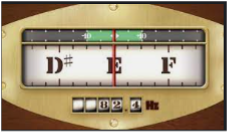
right or not.
They can practice by first playing a random note on the piano, of course it should be in the middle of their vocal range and then start to sing. The vocal teacher should show them the feeling of going higher or lower of the voice so that they can understand the term of singing in right pitch and they can practice by themselves. By observing the movement of the red line in this App, they can know which note they are singing and they can adjust it visually.
Pros: easy to use, to see, No need of Internet
Cons: can adjust for only one note separately, cannot adjust the whole melody.
Second, Singscope:
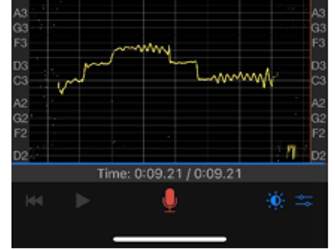
This Mobile App allows users to record a piece of music and then display it as a graph which shows the pitch of notes. In this example, we use a sample with pitches C3-D3-E3-D3-C3 (do-re-mi-re-do). When using this application, we can visually recognize "shape" of the sound just created. In the example drawing, we see that at the first C3 note, the sound is raised from the pitch of another note and has not yet started at the pitch of the C3 note. At the E3 note, it is partially stable and at the last C3 note, it is stable after 0.5s, shown in the regular oscillation amplitude with a sine wave shape.
Pros: you can listen to a recorded song with a visual representation of a series of pitches, free to use.
Cons: you can't download the song; you can only listen.